
If your NELFUND loan shows verified but not approved, or it has said Pending for weeks, you are not alone. It is the most common complaint about the student loan. A NELFUND status only tells you where your request is in the queue. It does not tell you why it is stuck or who is meant to move it next. This guide fills that gap. It uses real screenshots of the Loans page on the official portal (taken 8 November 2026) and NELFUND's own public statements.
Before you read onYou can only check your real status by logging in at portal.nelf.gov.ng. This site cannot see your application, and nobody here will ever ask for your NIN, BVN or password. If you have not applied yet, start with our NELFUND portal guide.
How to Check Your NELFUND Status
Log in at portal.nelf.gov.ng with your email and password. Open the menu at the top right and tap Loans. The Loans page shows counters for Total, Approved, Pending and Declined loans. Under them are two tabs, Institutional Loans (tuition) and Upkeep Loans, each with a status and a View button for the full statement.
The status checker is not a separate website. It sits inside your student dashboard on the official portal. These are the steps as they appeared on 8 November 2026.
Log in and look at the dashboard
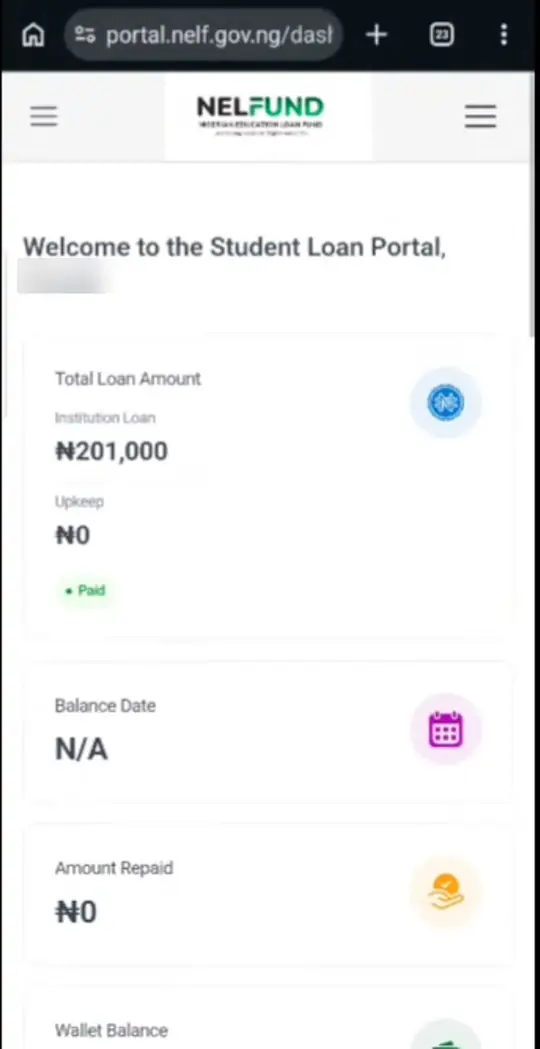
Sign in at portal.nelf.gov.ng with the email address and password you used when you created your account. The first screen is the dashboard. It shows Total Loan Amount split into Institution Loan and Upkeep, then Balance Date, Amount Repaid and Wallet Balance.
The dashboard gives a money summary, not a detailed status. A "Paid" tag under a figure is a good sign, but check the Loans page for each request.
Open the menu and tap Loans
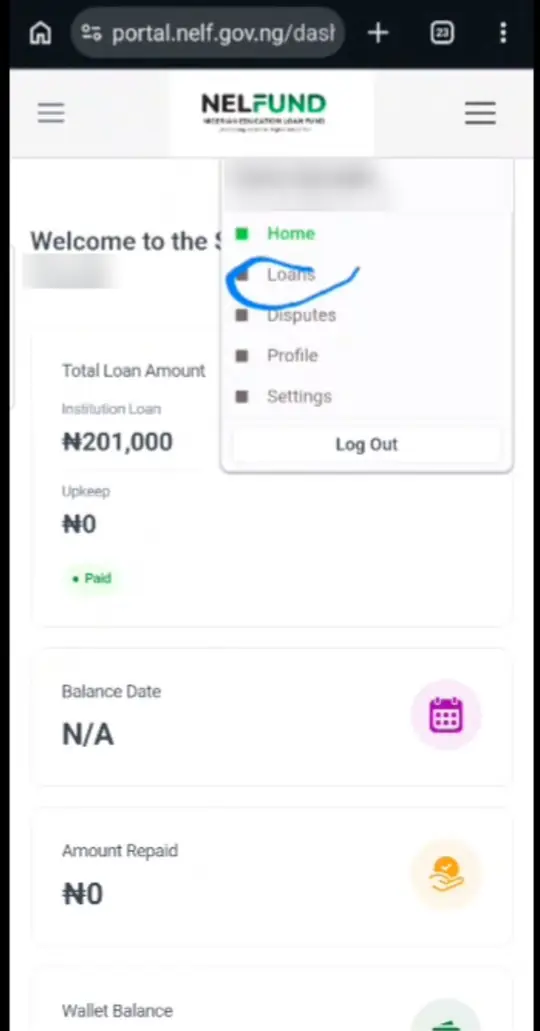
Tap the menu icon at the top right. You will see Home, Loans, Disputes, Profile, Settings and Log Out. Tap Loans.
Remember Disputes. Later in this guide we explain when it is worth using it.
Read the summary counters and the session notice
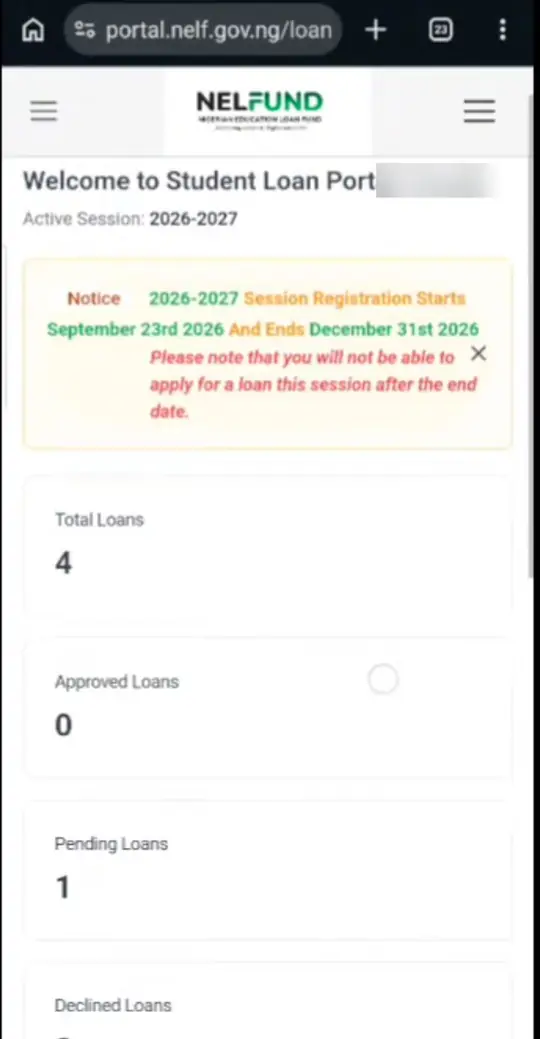
The top of the Loans page shows the Active Session (2026-2027 when we checked) and a notice box. On 8 November 2026 the notice read that 2026-2027 session registration starts 23 September 2026 and ends 31 December 2026.
Below it are four counters: Total Loans, Approved Loans, Pending Loans and Declined Loans. They count every request you have made, across sessions and across tuition and upkeep. "4 total, 1 pending" can simply mean old loans plus one new request.
Check the Institutional Loans tab (tuition)
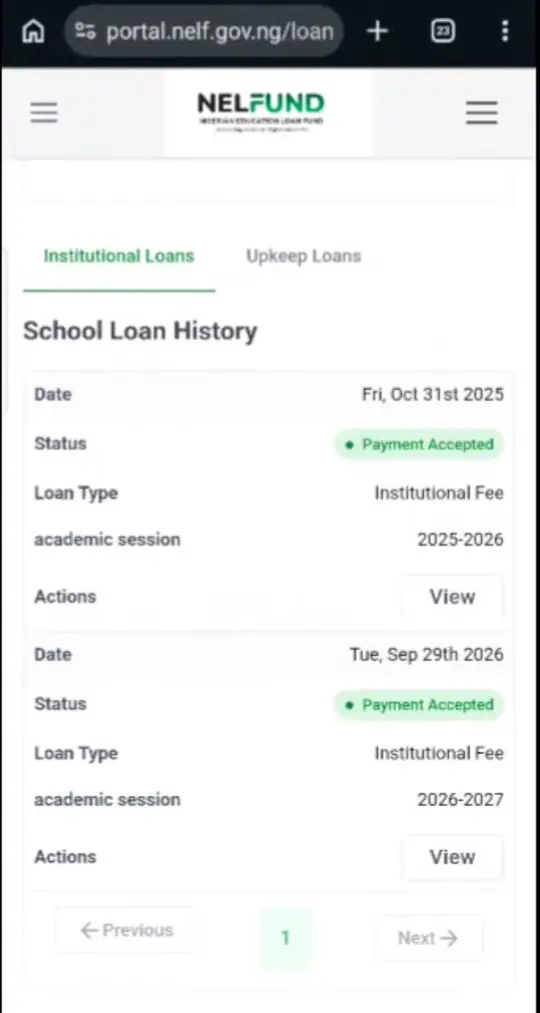
The first tab, Institutional Loans, is headed "School Loan History". Each row shows the date, the Status, Loan Type ("Institutional Fee") and the academic session.
In our screenshot, both the 2025-2026 and 2026-2027 tuition requests show Payment Accepted.
Check the Upkeep Loans tab separately
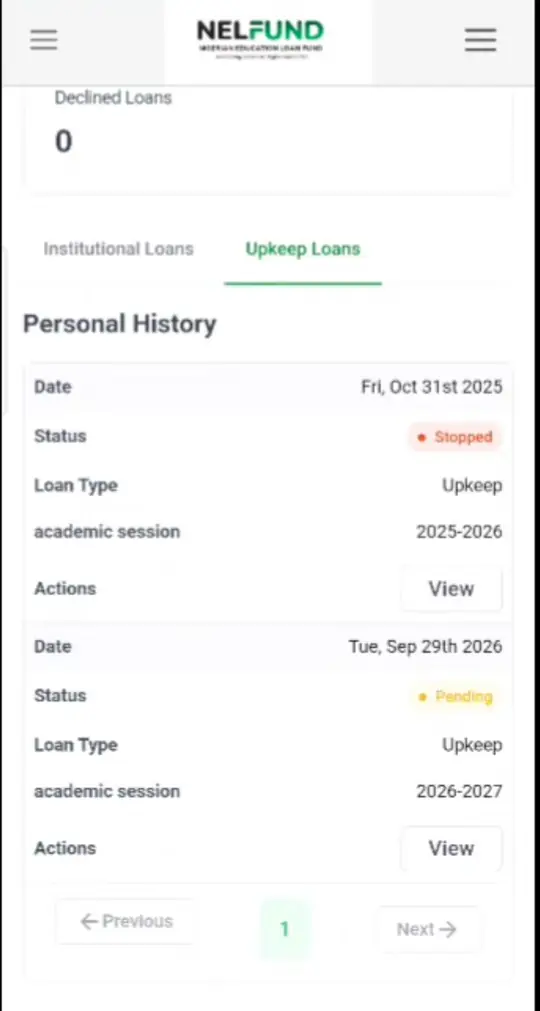
The second tab, Upkeep Loans ("Personal History"), lists your upkeep requests. Tuition and upkeep have separate statuses. Your fees can be paid while your upkeep is still pending.
In our example, 2025-2026 upkeep shows Stopped and 2026-2027 upkeep shows Pending, while tuition for the same student shows Payment Accepted.
Tap View to open the loan statement
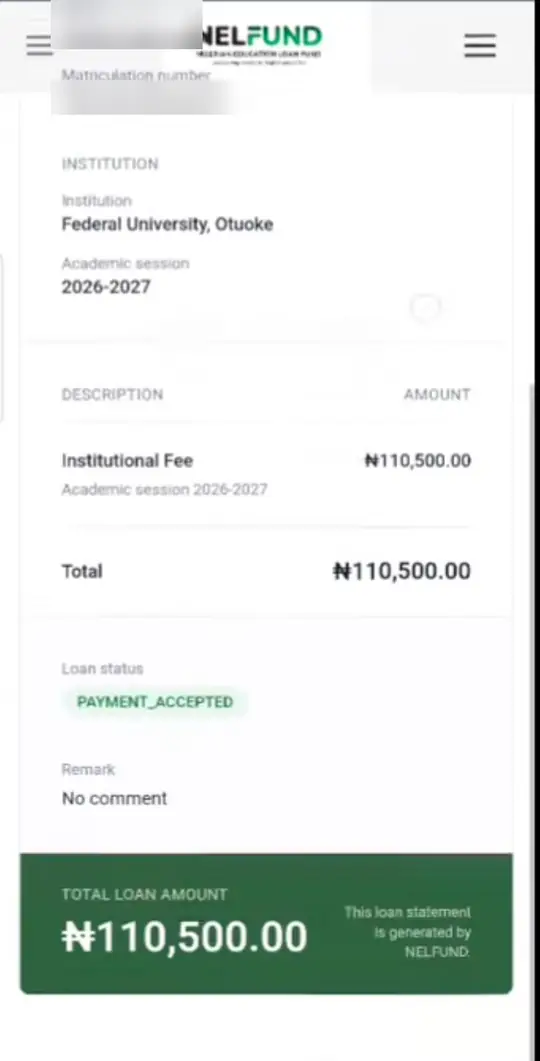
Tap View on any line to open the statement. It shows your name, matric number, institution, academic session, the amount, the Loan status (for example PAYMENT_ACCEPTED) and a Remark field.
Always read the Remark. If NELFUND or your school has written a reason for a delay or a decline, this is where it appears. "No comment" means no reason has been recorded.
Take a screenshot of your Loans page and statement every time you check. If you ever need to complain to your school or NELFUND, dated screenshots are your evidence.
What Each NELFUND Status Means
Pending means the request is waiting for school verification or NELFUND review. Verified means your school confirmed you, but NELFUND has not approved payment yet. Approved means payment is being scheduled. Payment Accepted or Disbursed means money was released. Declined or Rejected means a check failed. Stopped on upkeep means payments for that session ended.
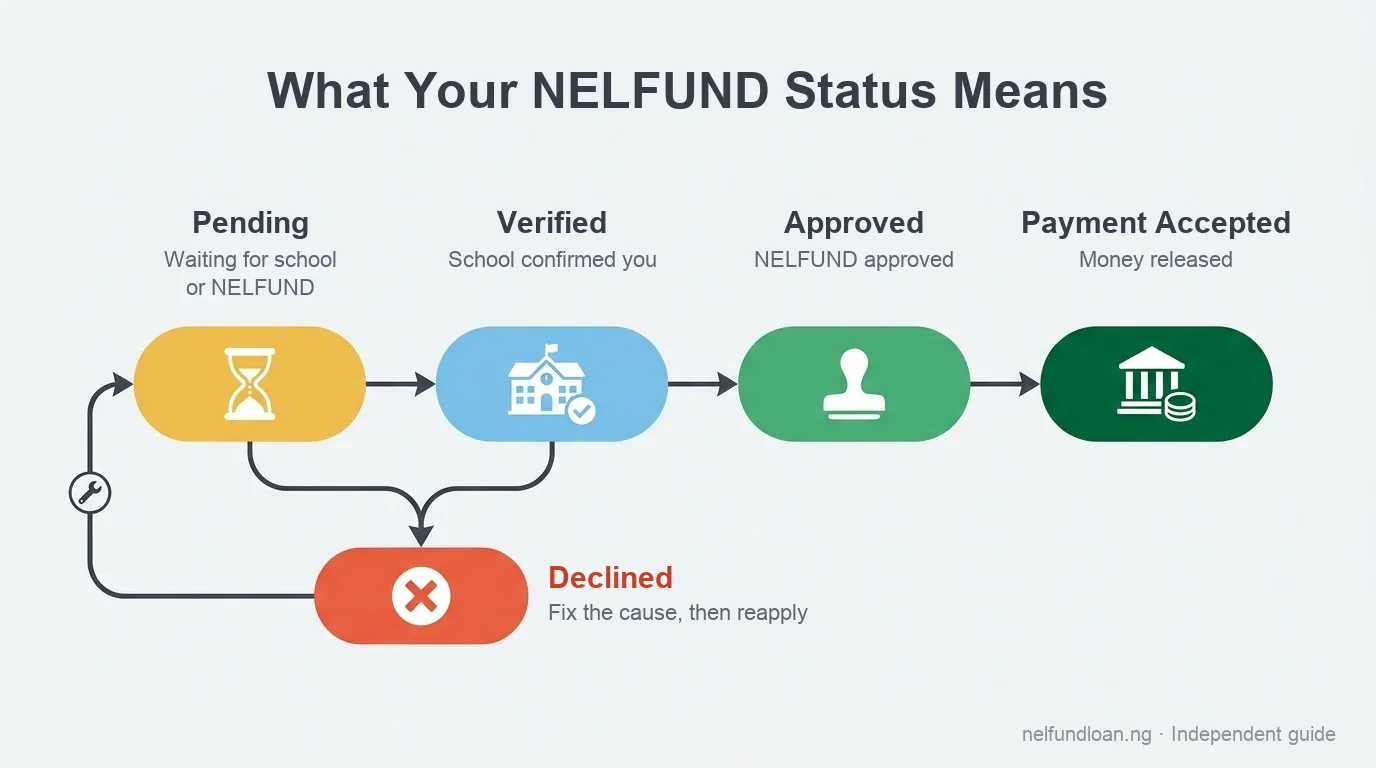
NELFUND has not published an official glossary of status words. The table below combines what we saw on the portal on 8 November 2026 with wording students and news reports describe. Where a status was reported but not seen by us, we say so.
| Status | What it means | Who acts next | Typical wait |
|---|---|---|---|
| Pending Seen on portal | Your request is submitted and in the queue. Usually your school has not finished confirming you, or NELFUND has not finished its review. | Your school first, then NELFUND | No official timeline. Often weeks, longer at the start of a session. |
| Verified Reported | Your institution has confirmed you are its student and your details check out. Approval and payment have not happened yet. | NELFUND | Depends on NELFUND's payment batches. |
| Approved Seen as a counter | NELFUND has approved the loan. Tuition is scheduled for payment to your school; upkeep (if chosen) to your bank. | NELFUND, then your school's bursary | Until the next payment batch. |
| Payment Accepted Seen on portal | Seen on institutional (tuition) loans. The payment has gone through for that session. The statement shows it as PAYMENT_ACCEPTED. | Your school's bursary must update your fee record | Schools can take days to weeks to reflect it. |
| Disbursed Reported | Money has been released. Students have reported seeing "Disbursed" with no upkeep received (Nairametrics, June 2025), so treat it as "sent", not "arrived". | You check your bank or school; then report if missing | Bank credit is usually quick, but backlogs happen. |
| Declined / Rejected Declined seen as a counter; Rejected reported | The request failed a check: a data mismatch, eligibility, or the school did not confirm you. | You fix the cause; sometimes your school | Until the cause is fixed and you can reapply. |
| Stopped Seen on portal (upkeep) | Upkeep payments for that line have ended or been paused. Old sessions commonly show Stopped once the session is over. | NELFUND and your school | Usually until a new session's upkeep request is active. |
Ready? Continue on the official NELFUND portal
Goes to portal.nelf.gov.ngFree to apply, no agentsOpens in a new tab
NELFUND Status Checker Helper
Pick the status you see on your Loans page and the helper tells you what it means, who acts next, roughly how long to expect, and the next three things to do. It runs entirely in your browser. It never asks for your NIN, BVN, email or password, and it does not connect to the NELFUND portal.
The helper explains statuses; it cannot check them. Your real status only appears after you log in at portal.nelf.gov.ng. Any website, WhatsApp number or "agent" offering to "check your NELFUND status" with your NIN or BVN is a scam.
NELFUND Verified But Not Approved: What Next
Verified means your school has confirmed you. The next move belongs to NELFUND, which approves requests and releases money in batches. Do not reapply or create a new account. Check your bank account name matches your BVN, confirm your upkeep choice, read the Remark on your statement, and watch NELFUND's official X account for batch announcements.
"My NELFUND is verified, what should I do?" is one of the most searched questions about the loan. The honest answer is that, most of the time, you wait. But you should wait with everything ready, so nothing on your side holds up approval.
What "verified" means on NELFUND
NELFUND relies on tertiary institutions to verify student applications, and has publicly pressed them to move faster. In September 2025 it urged schools to speed up "timely verification and approval of successfully completed and submitted applications" (VON, 3 Sep 2025). So verified usually means the school has done its part. The request now sits with NELFUND for final checks and a payment batch.
After NELFUND verification: your checklist
- Do not reapply or open a second account
A duplicate request can trigger a mismatch or a decline. One account, one request per session.
- Confirm your bank details match your BVN
Log in, open Profile, and check the bank name and account number in Account Details. The account must be in your name, the name on your BVN. The portal warns that you have a limited number of account reset attempts per session. Ours said "You have only 2 account reset attempt left for 2026 Academic session", so only change details when you are sure.
- Check whether you chose upkeep
Upkeep is optional and only paid if you selected it in your loan request (Nairametrics, July 2026). If your Upkeep Loans tab is empty for this session, you did not request it.
- Read the Remark on the statement
Tap View. If there is a note, act on it. If it says "No comment", nothing is wrong on record.
- Ask your school if anything is outstanding
Sometimes "verified" is only partial, for example your school confirmed you but has not confirmed your fee amount. Your school's NELFUND desk officer can tell you.
- Follow the official announcements
NELFUND announces disbursement rounds on its official X account (@nelfund) and on nelf.gov.ng. We log these on our NELFUND news today page.
When verified-but-not-approved becomes a real problem
If other verified students in your department, same level and same session, have moved to Approved or been paid and you have not, something specific to your record may be wrong. At that point:
- Recheck that your name is spelled identically on NIN, BVN, JAMB and your school record (see the mismatch fixes below).
- Ask your school's NELFUND desk officer to confirm your fee amount was submitted for this session.
- Raise it through the portal's Disputes section or NELFUND's official channels, with your screenshots (see contact NELFUND support).
Why Is My NELFUND Loan Still Pending
A NELFUND loan usually stays pending for one of five reasons, in this order of likelihood: your school has not uploaded or verified your records; your name differs across NIN, BVN, JAMB and school records; your bank account does not match your BVN; a field or upload is incomplete; or NELFUND has a backlog. Each has a different person who must fix it.
Work through these causes in order. The first two cause most stuck applications, and neither is fixed by waiting.
| # | Cause | Who fixes it | The fix |
|---|---|---|---|
| 1 | School has not uploaded or verified your records | Your school (registry / NELFUND desk) | Ask the desk officer to confirm your upload and verification. Escalate through the SUG if ignored. |
| 2 | Name or data mismatch (NIN, BVN, JAMB, school) | You, with NIMC, your bank, JAMB or your school | Pick the correct record (usually NIN) and correct the others to match it. |
| 3 | Bank account does not match BVN | You and your bank | Use an account in your own name, the name on your BVN. Update carefully; reset attempts are limited. |
| 4 | Incomplete fields or unclear uploads | You | Check all four profile sections show a tick. Re-upload clear documents if asked. |
| 5 | Backlog at NELFUND | NELFUND | Nothing to fix. Keep your details ready and watch official announcements. |
1. Your school has not uploaded or verified your records
NELFUND cannot approve you until your institution confirms you are its student. Schools upload student records to NELFUND's verification system and then verify each application. Guides that track stuck applications list this as the most common cause (naijasabi). NELFUND itself has publicly blamed slow institutional verification for delays (VON, Sep 2025).
Fix: go to your school's NELFUND desk with your screenshots. The full method, with a message you can copy, is in the next section.
2. Your name or details do not match across records
NELFUND checks your NIN and BVN against your JAMB record. In 2024 it warned that "NIN and BVN verification can fail if the details students provide do not match JAMB details" (MySchoolNews, May 2024). A missing middle name, a swapped first and last name, a different spelling (Mohammed vs Muhammad) or a married surname on one record and a maiden name on another is enough.
Fix: see NIN, BVN and JAMB mismatch fixes.
3. Your bank account does not match your BVN
Upkeep is paid into the bank account on your profile, and that account must belong to you. A parent's or friend's account, or an account opened under a slightly different name, can hold up payment.
Fix: use an account in your own name, the name your BVN carries. In the portal, open Profile and then Account Details to check. Change it only if it is wrong, because the portal limits how many times you can reset account details per session.
4. Incomplete fields or unclear uploads
Your profile has four parts: Personal, Contact, Educational and Account details. Each needs a green tick before your application is complete. Blurry or cut-off documents, such as an admission letter photographed at an angle, can also hold things up (naijasabi).
Fix: log in, open Profile and check all four sections. If you are asked to re-upload, scan the whole page in good light, with all four corners visible.
5. Backlog at NELFUND
At the start of each session, and when the portal is about to close, very large numbers of students apply at once. NELFUND reported 1,659,853 applications processed in its 3 October 2026 report (Nairametrics). Even with everything correct, you may simply be in a long queue.
Fix: if causes 1 to 4 are ruled out, wait. Check every week or two, not every hour, and follow our NELFUND news page for batch announcements.
School Has Not Uploaded Your Records
Your school's NELFUND desk officer, usually in the registry, student affairs or the bursary, uploads and verifies your records. Visit them with your matric number, a screenshot of your pending status, and your admission letter. Ask whether your record is uploaded and verified for this session. If nothing happens, escalate through your Students' Union, then to NELFUND.
Who handles NELFUND on campus
Every participating institution assigns staff to handle NELFUND. The office differs from school to school. It is commonly in the registry or academic records, the Dean of Student Affairs' office, or the bursary, which handles fees. Many schools also post NELFUND notices on their websites and departmental noticeboards. If you are not sure, ask your course adviser or departmental secretary who the "NELFUND desk officer" is.
What to bring
- Your matric number and full name exactly as on your school record
- A screenshot of your Loans page showing the pending status and the date
- Your admission letter (printed or on your phone)
- Your JAMB registration number
- Your level and department for this session
Do not hand over your portal password, NIN slip or BVN to anyone. A genuine school officer does not need your password to verify you.
A message you can send to the NELFUND desk
If your school takes requests by email, or you need something in writing, copy and edit this:
If your school does not respond
- Follow up in person after one week
Polite, regular follow-up works better than one angry visit. Write down the name of whoever you speak to and the date.
- Go through your class representative and departmental association
When many students in one department are stuck, a joint request carries more weight.
- Escalate through the Students' Union (SUG)
SUG welfare officers often have a direct line to the school's NELFUND team and can raise group cases.
- Raise it with NELFUND
If your school still does not act, use the portal's Disputes section or NELFUND's official channels. Explain that your institution has not verified you, and attach your evidence. See contact NELFUND support.
NIN, BVN and JAMB Mismatch Fixes
Pick one record as the correct one, usually your NIN, because the others are checked against it. Then correct the rest to match: BVN at your own bank, JAMB through JAMB's official correction process, and your school record through the registry. Fix the source records first, then update your NELFUND profile. Never try to make the portal match a wrong record.
A name mismatch is the most frustrating NELFUND problem, because the portal does not always tell you which record is wrong. Work through it in this order.
Step 1: Write your name exactly as it appears on each record
Put the four versions side by side, letter by letter:
| Record | Where to see it | Who corrects it |
|---|---|---|
| NIN | Your NIN slip or the NIMC app | NIMC (National Identity Management Commission) |
| BVN | Ask your bank, or check your bank app's profile | Your bank |
| JAMB | Your JAMB result slip or admission letter from CAPS | JAMB |
| School record | Your school portal or ID card | Your school registry |
Look for missing middle names, initials instead of full names, swapped first and last names, alternate spellings and old surnames.
Step 2: Decide which record is correct
For most students the NIN is the anchor. It is the national identity record, banks link BVN to it, and many other systems check against it. If your NIN itself is wrong, for example a misspelt name, fix it first, or everything you match to it will also be wrong.
Step 3: Correct each record at its source
- NIN: NIMC says data modifications are now done on its official self-service portal, selfservicemodification.nimc.gov.ng, not by agents. Name changes usually need supporting documents such as a sworn affidavit, a newspaper publication or a marriage certificate, depending on the change. Check the current documents and fee on that portal before you start.
- BVN: visit any bank where you hold an account and ask for a BVN data update to match your NIN. For a name change, banks usually ask for valid ID, a sworn affidavit, a newspaper publication and, if relevant, a marriage certificate. The bank sends the request to NIBSS, which updates the BVN record. Documents and processing times vary by bank.
- JAMB: corrections go through JAMB's eFacility portal (efacility.jamb.gov.ng), usually at an accredited CBT centre, and JAMB charges an official fee for them. JAMB takes your name from your NIN, so correct your NIN first. Ignore unofficial agents who promise to "fix" your JAMB name outside this process.
- School record: ask the registry or academic records office to correct your name on the student database, with your NIN and JAMB documents as evidence.
Corrections take time to reach every system. After a NIN or BVN change, give it a while before retrying the portal, and keep receipts and screenshots of every correction.
Special case: married students
This is a common trap. Many married students have their married surname on NIN but still have their maiden name on BVN, JAMB or school records, which triggers a mismatch. Guides for married applicants suggest this order: settle which name your NIN carries, update your BVN at your bank to match it exactly, then ask your school registry to align your record. Where JAMB carries the old name, follow JAMB's correction process or ask your school how it handles name-change cases for NELFUND. Bring your marriage certificate and any affidavit or newspaper publication of the change.
Special case: swapped or missing names
If JAMB lists "Okafor Adaeze Grace" and NIN lists "Adaeze Grace Okafor", the letters are the same but the order differs. Some checks accept this, others do not. If your application is stuck and this is the only difference, ask your school desk officer whether it is the cause before starting a formal correction. A missing middle name on one record is a similar case.
Special case: "bank verification service unavailable"
Students sometimes see an error saying BVN verification is unavailable. This is often a temporary service issue rather than a problem with your BVN. Try again later, preferably outside peak hours (late night or early morning), before assuming your BVN is wrong.
NELFUND Loan Denied or Rejected
A declined or rejected NELFUND loan usually means a failed data check (name or BVN mismatch), an eligibility problem (for example a postgraduate or second-degree programme), or your school not confirming you. Open the loan statement and read the Remark for a reason. Fix that cause first. Then ask your school's NELFUND desk whether you can reapply while the session is still open.
Common reasons for a declined loan
- Data mismatch: NIN, BVN, JAMB or school records do not agree.
- Eligibility: reports say postgraduates and students who already have a degree are not covered (thecondia).
- School did not confirm you: your institution could not match you to its records, or declined to verify you, for example if you are not registered for this session.
- Duplicate request: a second account or a second request for the same session.
- Fee or programme issue: the school's submitted fee or your programme does not fit NELFUND's rules.
Read the Remark first
On the Loans page, tap View on the declined line. Your loan statement has a Remark field. If there is a reason, it tells you exactly what to fix. If it says "No comment", ask your school's NELFUND desk officer, who can often see more detail than you can.
Can you reapply after a decline?
NELFUND has not published a single public rule on reapplying after a decline. In practice it depends on the reason and on whether the session's application window is still open. The 2026/2027 notice on the portal says registration ends 31 December 2026 and that you cannot apply for the session after the end date. If you are declined, fix the cause quickly so you still have time to try again. Do not create a new account to get around a decline. Duplicate accounts make things worse.
Rejected after earlier payments
Some students were paid in an earlier session and then see a decline in a new one. NELFUND loans are requested per session, so each session's request is checked again. Common causes are a change in your school record (a carry-over, a change of programme, a gap year), a correction to your BVN or bank details, or your school not confirming you for the new session. Ask your school first, since most of these are school-side records.
What about university-specific denials?
From time to time students at one institution report denials or delays together (searches such as "UniAbuja NELFUND loan denial" show this). When it hits many students at one school, it is usually an institution-level issue with records or verification, not your personal file. Follow your school's official announcements and our NELFUND news page, and keep your own records correct so you are ready when it is resolved.
How Long NELFUND Takes to Approve
NELFUND has not published an official approval time. Approval depends on two queues: your school verifying you, and NELFUND processing verified requests in payment batches. When records are correct and the school acts quickly, students report weeks. When the school is slow or records mismatch, it can take months. Anyone promising a fixed number of days is guessing.
"How long does NELFUND take to approve a loan?" has no single honest answer. What we can say is what affects it:
- Your school's speed. Verification is done by institutions, and NELFUND has publicly urged them to shorten turnaround times (VON).
- When you applied. Early applicants are usually processed before the rush at the deadline.
- Whether your records match. A clean record moves; a mismatched one stalls.
- NELFUND's payment batches. Approved requests are paid in rounds that NELFUND announces publicly.
We will never quote a date NELFUND has not announced. For the latest announced batches, see NELFUND news today. For upkeep timing specifically, see NELFUND upkeep news today.
Status Went Backwards or Disappeared
A status that changes from Verified back to Pending, or a loan line that briefly disappears, usually means your record was sent back for re-checking, a correction was made, or the portal was being updated. Take a screenshot, wait a day or two, then check again. If it stays changed, ask your school's NELFUND desk whether your record was re-submitted.
Common reasons
- Your school re-submitted or corrected your record, so it went back into the verification queue.
- You changed your details, such as bank account or contact information, and the change triggered a fresh check.
- Portal maintenance or updates. Dashboards can show incomplete data while systems are updated.
- You are looking at a different session or tab. Remember Institutional and Upkeep loans are separate tabs, and each session has its own line.
What to do
- Screenshot the current state with the date visible.
- Log out, clear your browser cache or try another browser, and log in again.
- Check both tabs and the session label on each line.
- If it has not returned after a few days, ask your school's NELFUND desk. If they cannot explain it, raise a dispute with your before-and-after screenshots.
Contact NELFUND Support
Contact your school's NELFUND desk first for anything about verification, fees or school records. Contact NELFUND for portal errors, payment problems or a status that your school cannot explain. Use the portal's Disputes section or Get Help link, NELFUND's official email [email protected], or its verified X account @nelfund. Include your name, matric number, school, session and screenshots, never your password.
Who to contact for what
| Problem | Contact first |
|---|---|
| Pending for weeks; school verification | Your school's NELFUND desk officer |
| Fee amount wrong, or fees not marked paid after Payment Accepted | Your school's bursary |
| Name mismatch | NIMC, your bank, JAMB or registry, depending on which record is wrong |
| Disbursed but no money; upkeep missing | NELFUND (Disputes or official channels), after checking your bank |
| Portal error, login or account problem | NELFUND via the portal's Get Help link, a ticket on nelfund.esupport.ng, or [email protected] |
| Declined with no reason in Remark | Your school desk first, then NELFUND |
Official NELFUND channels
- Inside the portal: the Disputes item in the menu after login, and the Having Trouble? Get Help link at the top of the sign-up pages.
- Email: [email protected] (general enquiries).
- X (Twitter): @nelfund. Check for the verified badge, as fake accounts copy the name.
- Support tickets: nelfund.esupport.ng, NELFUND's support ticketing platform, linked from the contact page on nelf.gov.ng. The website lists no phone helpline.
We have not confirmed a NELFUND phone number, so we do not publish one. Phone numbers shared on WhatsApp or in social media comments are often scams.
What to include so it gets resolved
- Full name exactly as on your NIN
- Your school, matric number, department and level
- The academic session and the loan type (Institutional or Upkeep)
- The status you see and since when
- Screenshots of the Loans page and the statement
- What you have already done (for example, "school desk confirmed my record was uploaded on [date]")
Never send your portal password, BVN or full bank details by email, DM or WhatsApp. NELFUND staff do not need your password to look up your application, and NELFUND never charges a fee to apply or to "speed up" approval.
NELFUND Status FAQ
Quick answers to the questions students ask most about NELFUND status: what verified means, why loans stay pending, how long approval takes, how to know you are approved, and what to do after a decline. Each answer links to the fuller section above where there is more to do.
What does verified mean on NELFUND?
Verified means your school has confirmed you are its student and your details check out. It is not approval. NELFUND still has to approve the request and pay it in a batch. See verified but not approved.
My NELFUND is verified, what should I do?
Do not reapply. Check that your bank account matches your BVN, check that you selected upkeep if you want it, read the Remark on your statement, and follow NELFUND's official announcements for the next payment batch.
Why is my NELFUND loan still pending?
Most often your school has not uploaded or verified your record. Next most common is a name mismatch between NIN, BVN, JAMB and school records. Then bank details, incomplete fields, and finally NELFUND backlog. Ask your school's NELFUND desk first.
How long does NELFUND take to approve a loan?
There is no official timeline. It depends on how quickly your school verifies you and on NELFUND's payment batches. Students with clean records at responsive schools report weeks; slow verification or mismatches can mean months.
How do I know if my NELFUND loan is approved?
Log in at portal.nelf.gov.ng and open Loans. The Approved Loans counter goes up, and the line for your request shows its status, such as Payment Accepted for tuition. Tap View for the statement.
Is there a NELFUND tracking ID or status checker website?
No separate tracker is needed. Your status is on the Loans page after you log in to the official portal. Any other site asking for your NIN or BVN to "check your status" is not official.
Why does my tuition show Payment Accepted but upkeep shows Pending?
Tuition and upkeep are separate requests with separate statuses. Tuition goes to your school; upkeep goes to your bank and is paid only if you selected it and while your school is in session.
What does Stopped mean on NELFUND upkeep?
It means upkeep payments for that line have ended or been paused. It is common on upkeep lines from a previous session. Check the session label and make sure you requested upkeep for the current session. See our NELFUND upkeep guide.
My status says Disbursed but I have not received money. Why?
Disbursed means sent, not necessarily arrived. Tuition goes to your school, so check your school portal. For upkeep, check the account linked to your profile. Students reported this problem in 2025 (Nairametrics). See disbursed but no money.
Can I reapply if my NELFUND loan is declined?
Possibly, if you fix the cause and the session's window is still open (2026/2027 ends 31 December 2026, per the portal notice). Read the Remark, fix the record, then ask your school desk. Do not open a second account.
Which record should I fix first if my names do not match?
Usually your NIN, because the other records are checked against it. If your NIN is right, correct BVN at your bank, JAMB through JAMB's official process, and your school record through the registry.
Can someone at NELFUND or an agent speed up my approval for a fee?
No. NELFUND never charges a fee to apply or to approve a loan. Anyone asking for money or your password to "push" your application is a scammer.
Should I change my bank details while my loan is pending?
Only if they are wrong. Changes can trigger new checks, and the portal limits account reset attempts per session (ours showed 2 left for 2026). If your account is in your own BVN name, leave it.
Still need to apply, log in or reset your password? Go back to the full NELFUND portal guide, with registration and login steps in screenshots. For repayment questions after you graduate, see NELFUND repayment rules.
Sources
- Screenshots of portal.nelf.gov.ng (dashboard, menu, Loans page, Institutional and Upkeep tabs, loan statement), taken 8 Nov 2026, personal details blurred
- Voice of Nigeria: Accelerate verification of student loan applications, NELFUND urges institutions (3 Sep 2025), checked 8 Nov 2026
- MySchoolNews: NELFUND warns students on NIN, BVN verification failure (27 May 2024), checked 8 Nov 2026
- Naijasabi: NELFUND verification pending and upkeep delay fixes, checked 8 Nov 2026
- Nairametrics: NELFUND says N59.8 billion disbursed amid complaints from beneficiaries (7 Jun 2025), checked 8 Nov 2026
- Nairametrics: NELFUND denies suspending upkeep allowance (11 Jul 2026), checked 8 Nov 2026
- Leadership: NELFUND records 1.69m applications, checked 8 Nov 2026
- Thecondia: How to apply for NELFUND student loan 2026, checked 8 Nov 2026
- Nairametrics: NELFUND student loan disbursements hit ₦372.62 billion (4 Oct 2026), checked 9 Nov 2026